Showing posts with label technology. Show all posts

It's Not Just Books and Bonbons

 by Deborah Zeman, Coppell High School 

Clubhouse logo
https://ccnull.de/foto/meet-clubhouse-the-voice-only-social-media-app/1038705
Lizenz: CC-BY 2.0  Marco Verch


The last year of Covid has thrown a wrench into everything: everyday life, connecting, collaborating, you name it. As an edtech librarian, I’ve been searching for ways to collaborate more with librarians in the same boat as me: trying to build a collaborative partnership with teachers while in a remote setting. It hasn't been easy, until now. Over the past few months, I have been playing around with the Clubhouse app.

You might be thinking to yourself, “Oh great, another app to add to my already overloaded plate. What IS this thing called Clubhouse?" It is an audio-only social media platform where users can listen in to discussions or panels, start conversations, and network with other like-minded professionals.

At first when I joined, I was skeptical. Clubhouse reminded me of another audio platform that I wasn’t super set on. However, I decided to give Clubhouse a shot. After a couple of weeks of maneuvering around, making connections, listening in to panels, I discovered it was definitely a place to create a space for librarians, whether academic, public and school. For myself, I joined clubs that are all about books, such as What Are You Reading?, Diverse Shelves, Entrepreneurs on Etsy, and Education Innovation to name a few. I’ve joined chats over edtech, diverse books, young adult fiction, and even chats with Elon Musk and Ashton Kutcher. In some I have jumped up on stage and joined the discussion; during most, however, I just listen and learn. The sky is truly the limit on Clubhouse.

I made a lot of connections with other professionals in the edtech world, however, my search for fellow librarians was coming up empty. My original search came up with maybe fifteen other librarians but no librarian groups. As I became more frustrated I thought to myself, “Wait, why can’t I build a Librarians’ Clubhouse, one where librarians can discuss topics from advocacy to connecting with patrons, to favorite tech tools and books genres?” From there, with a little help from Twitter & Facebook, It’s Not Just Books & Bonbons librarians’ Clubhouse was born. (The idea for the name will come in a later post.)

First stop - Monica Burns’ blog. This helped a lot. Here are some of her best tips to get started on the app:
  • First, download the Clubhouse app to get on the waitlist or reach out to a friend for an invite. (NEED to have an iPhone. Android app is coming soon!)
  • Next, follow educators on the platform by searching for keywords related to your area of interest.
  • Then, listen in to rooms on different subjects to get a feel for how the app works.
  • Finally, check your notifications and set an intention for using the app.

These tips helped me find my way around the app and guided me with starting up a librarians’ Clubhouse. Monica started a clubhouse specifically for edtech tips. She offers weekly edtech tip chats on Mondays, 7pm EST & Thursdays, 7pm EST. I always discover some new tips that help with getting around on Clubhouse.

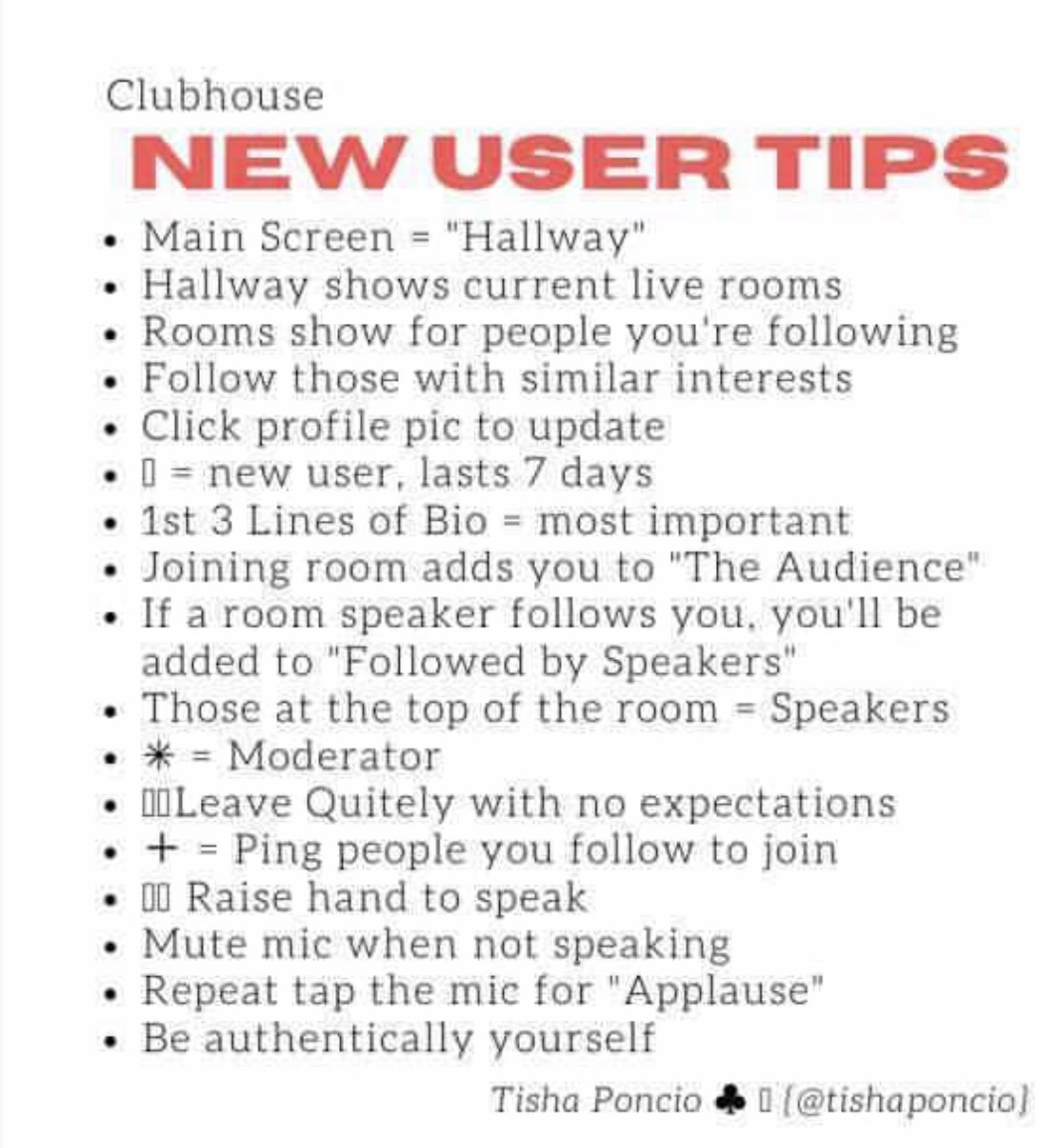
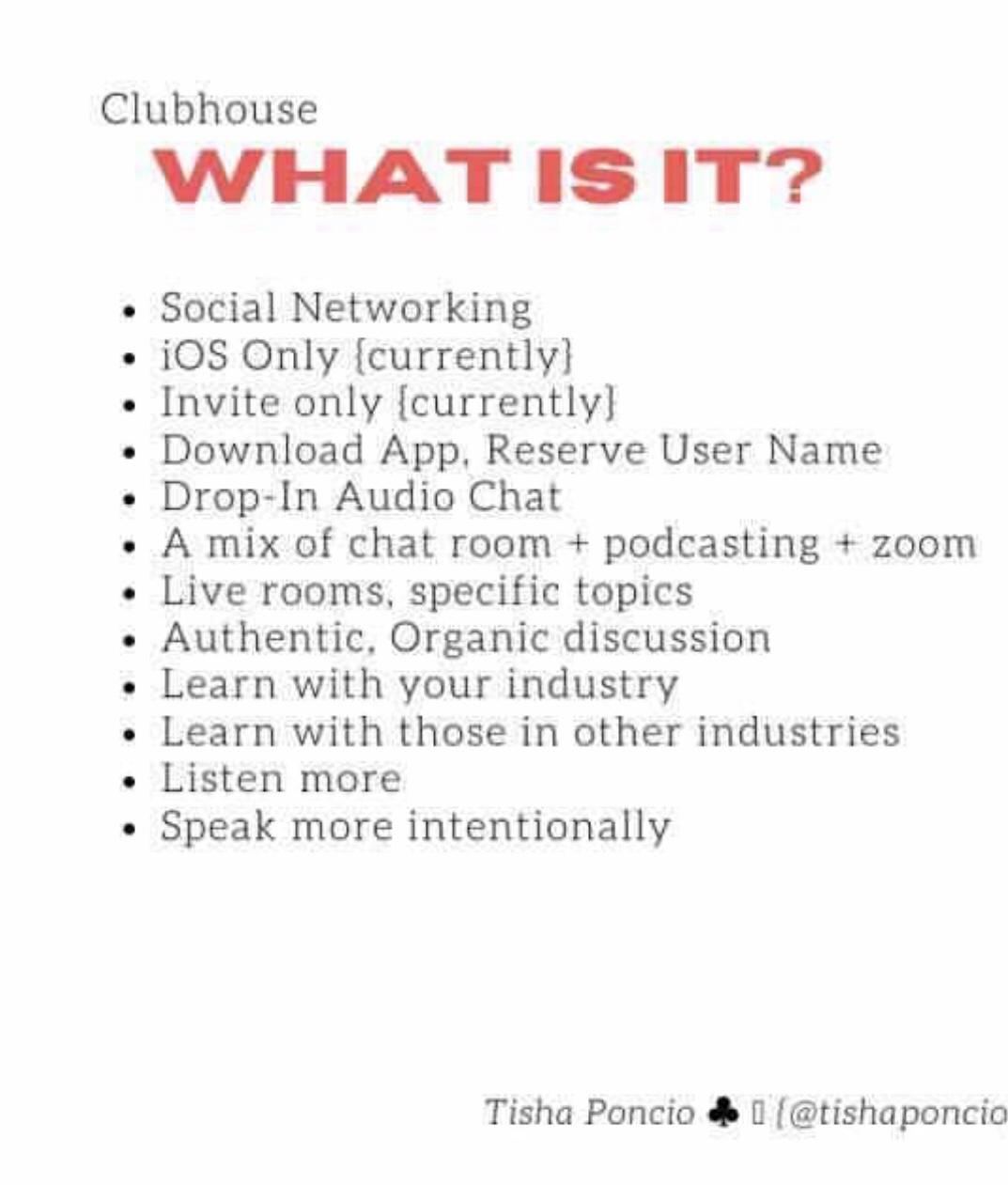
Tisha Poncio, my best friend and design guru, created some very helpful infographics to get started!


From there, as invites were added to my account, I started posting on Twitter & Future Ready Librarians’ group on Facebook. I invited fellow librarians who I knew would want to be a part of this growing community. My friends Amanda Hunt, Amy Hermon, & Heather Lamb moderate the rooms with me. The actual clubhouse was not yet approved, so to build momentum, we scheduled weekly chats on Wednesdays at 7:15 pm CST.

The first chat started out small, which was OK. We were new, not everyone was able to join. We were just getting our feet wet. We just got together to chat. Some people jumped in and stayed, some moved on, which is OK. There are no expectations. If people like what they hear, they will stay!

As the weeks have rolled on, and the It’s Not Just Books & Bonbons Clubhouse was approved, the group has grown. We have made connections with librarians from all over the world, including academic and public librarians. Each week we discuss collaboration, connecting with patrons and stakeholders, successes, and failures. And like Vegas, what happens in Clubhouse, stays in Clubhouse. If you want to learn more about the It’s Not Just Books & Bonbons Clubhouse, reach out to me on Twitter & I’ll send you an invite!

Suggestions for ISTE Certified Educator Success


In December 2019, I began the process of earning educator certification from International Society for Technology in Education (ISTE).  I was looking for a way to improve my technology skills to enhance my classes. I pinpointed ISTE professional development and applied for a grant. I was excited when I went to the Texas Computer Education Association (TCEA) headquarters for the two-day face to face training. I took the class with a variety of educators from all over the state of Texas. Then there were participants from Puerto Rico too. The interesting part of the training is that it is not just for classroom teachers. There were administrators, higher education instructors, technology teachers, and district personnel in the group.

The two-day training is not the only certification requirement. The training prepares educators for an interactive online class consisting of modules, materials, and assignments for each ISSTE Educator standard. A roadmap, a standard pamphlet, templates, and a handbook are provided. These materials prepare participants for the course and the documentation needed for certification. If participants work through the course and promptly complete assignments, they can get feedback on their work. Ultimately, some of these materials can become part of the portfolio.

After the online class is finished, candidates move to the next stage. This stage is the portfolio creation step. Although I thought I had researched the process, I underestimated the commitment that I would need to make progress. When I took the face-to-face training, I was confident that I would have more artifacts done by the end of the online class. I was not close to being done.

Therefore, I recommend that candidates take the time extension if they need it. Initially, I did not want to take an extension. The extension felt like a badge of shame. But I had an important deadline to meet. Candidates should not feel ashamed if they need the extension. I was not judged.  In fact, early on in the process, participants receive messages telling them how to apply for the extension.  I tried to avoid needing to extend, but in the end, I took it, and it relieved some of the pressure.

With this said, here are some tips for completing the portfolio. My first tip is to make friends with the people in your cohort. Exchange contact information during the two-day class. Then classmates can check each other’s work.

Next, use research skills to find tips from other people that have finished the certification process. Candidates can search for materials that have been submitted by previous ISTE certified educators. They often detail their experiences on blogs.  I was inspired by the blogs that I read. But, be careful. The requirements have changed, and documents are configured differently now.

Another tip is to think about some of the materials that already exist that can be adapted. Candidates may need to teach a lesson again and change it to incorporate the standards. Reenvision what has been done through a reflective scope to finish quicker.

After the training portion of the process, it is easy for one to believe that they know how to create each standard example. When the portfolio submission site is accessible, candidates will see examples of submissions for each standard. The models are based on the subject taught and the position of the candidate. It is best to review the examples so that one can conceptualize how to create artifacts.

Candidates need plenty of feedback. There will be meetings to enable interaction with other participants and ISTE facilitators. During the meetings, participants can share an artifact and ask a specific question about it. Also, sessions will cover each standard. In conjunction with posting portfolio samples to the discussion board, these meetings can be beneficial for receiving feedback.

Review the examples in the ISTE site early because they can be quite detailed. It took me a considerable amount of time to plan activities for each standard. Then the portfolio requires participants to put the examples in a format that is easy for the reviewers to read. There must be a short narrative based on the standards’ content to explain how materials fit the criteria. I also had to edit several videos or identify specific time frames in the videos to make my examples concise for reviewers.  

At the end of the process, participants will need to summarize what they have learned in a written narrative or a video. I found it easier to create the video. I recommend reviewing the summary requirements in advance and taking notes during the portfolio development.

In all, I feel like the ISTE Certified Educator process has helped me to be more mindful of my teaching and leadership practices for technology integration. Creating the portfolio forced me to spotlight my strengths and weaknesses in a way that demanded action and documentation of the steps that I took. While I passed, I will admit that I missed some standards. These are the areas that I have made it a priority to fix. If you want an honest critique of how you are utilizing technology to facilitate your school community's learning, I highly recommend that you complete the ISTE Certified Educator training.


The Power of Community

by Shirley Robinson, TLA Executive Director


The days leading up to March 11 were some of the most stress-filled I’ve ever experienced professionally in my 25-year nonprofit and association management career. Our incredible TLA staff were in full-on two weeks out from conference hustle-mode. Concerns over the threat of COVID-19 and what its impact could be to our conference were looming with dozens of calls and emails a day from members, exhibitors, and suppliers. When we ultimately made the decision with our Executive Board to cancel the conference that morning of the 11th, it was a relief that we had made the very painful but correct decision to protect the health and safety of our members and their communities. Ultimately, that same day the City of Houston banned all large events and the rest of the State and nation were all facing similar decisions. It was a time of uncertainty and shared commiseration of loss and mourning as we began the journey of the unknown.
Today, just a little more than four weeks later, the TLA Executive Board, membership, and staff are excited to be launching our first ever Virtual Conference. We’ll have more than 40 hours of pre-recorded content, live sessions and chat rooms for members to interact on April 21- 22, with even more fun surprises to come throughout the summer with an expanded learning series! A good quarter of the programs are targeted to our school library community with many more that may pique an interest you didn’t know you had. We’re thrilled that many registered attendees have chosen to convert their conference registration over to the Virtual meeting where they’ll receive many more hours of CE than they could have in a face-to-face conference. We’re also excited to see many members registering from far reaches of the state (and even some out of state) that haven’t previously been able to make the trip for time or budgetary reasons. If you know a school librarian who hasn’t attended TLA before please encourage them to register at https://txla.org/annual-conference/attend/schedule/.

Since joining TLA in early January I’ve already come to know and love the resiliency and spirit of collaboration of our library members. Even in my interview process I could see that the level of engagement and support of the association comes from an incredibly passionate and active base of members. This is a unique attribute that you don’t always find in associations, and it was exciting to see and has been even more exciting to experience. As we all navigate through the next few months, this resiliency will be a hallmark that not only helps the association to survive but we will thrive and grow through these lessons of innovation and creativity.


I can’t wait to meet more members from our school library community in the coming months. As a Mom, I thank you for the tremendous work you’re doing to support our educators and students, and as TLA’s Executive Director, I thank you for all you do to enrich this association. I am here for you – just a phone call or email away.

Shirley

Shirley Robinson, CAE
Executive Director
Texas Library Association

#txlchat, or Yes, Virginia, you really should be using Twitter for professional development

by Kristi Starr, librarian at Coronado High School in Lubbock ISD, TxASL Chair-Elect


August and September always bring lots of excitement and renewed energy. It’s a time of new beginnings and reboots. With September comes a new season of #txlchat - a weekly 30-minute Twitter chat each Tuesday evening at 8:00PM Central. Each week you will find a topic of discussion applicable to librarians and library settings. You can lurk (observe) or contribute as much as you’d like. From seasoned veterans to first-year librarians to those still completing certification, all are welcome!

#txlchat, like most Twitter chats, follows a Q&A format. Questions will appear every 5 or so minutes, noted by Q and the question number. Responses should be preceded with A and the question number. Each response should contain the hashtag #txlchat For a more in-depth guide to engaging in #txlchat, check out this document if you plan to follow from a mobile device or this guide for participating on a Chromebook, laptop, or desktop.

We know that it’s difficult to set aside time every week for a chat. Family takes priority, work can get in the way, and sometimes we just plain forget. That’s why each chat is archived using Wakelet. Sharon Gullett sends out the archive Tuesday night or Wednesday morning via the TLC listserv. You can also access all the archives at http://txlchat.weebly.com/archives.html Want a reminder 30 minutes before each chat? Sign up to receive messages via Remind. You may also preview the topics and questions for the week prior to the chat. If you want to share ideas but know you won’t be available, use a site like Twuffer to schedule your tweets.


#txlchat has been one of the best, most consistent learning platforms I’ve encountered. The weekly chats have allowed me to expand my professional learning network (PLN) through contact with other librarians across the state and country. For 30 minutes each week, we come together - learners and sharers from disparate locations and time zones, each seeking ways to improve our practices, to engage and impact our communities.

Topics for September include

September 3 - Welcome Back with the Power of TexQuest
September 10 - Falling into Programming
September 17 - Libraries Transform
September 24 - I Can’t Live Without ...

Join the #txlchat team tonight for a fast-paced half hour of learning. You’ll be glad you did!

TLA Conference 2019: Connecting to Innovate, Inspire, and Impact

by Nancy Jo Lambert, TASL Chair, Librarian at Reedy High School, Frisco ISD


The Texas Association of School Librarians has some outstanding programming in place for the 2019 Texas Library Association Annual Conference in Austin!

We hope that you will make plans to purchase a ticket and join us for Tech Camp this year! The time to register for Tech Camp is NOW! Check out this pre-conference experience for the forward-looking, technologically curious librarian: http://bit.ly/txla19tc and be sure to follow us on Facebook for updates http://bit.ly/techglamp2019


One of the new featured programs this year is the TASL Maker Playground! The Maker Playground, sponsored by MackinMaker, will feature 8 nationally recognized presenters who are expert makers! The Maker Playground will be open on Tuesday and Wednesday from 10-4. You can see the full playground schedule, presenter information, and videos here http://bit.ly/taslmaker

TASL is offering some amazing programs Monday-Thursday of conference. Mark your schedule now for the programs and presenters you most want to see! You can see program information by day here: http://bit.ly/tasl19programs and you can see the Flipgrid videos for all the TASL programs here https://flipgrid.com/tasl2019.


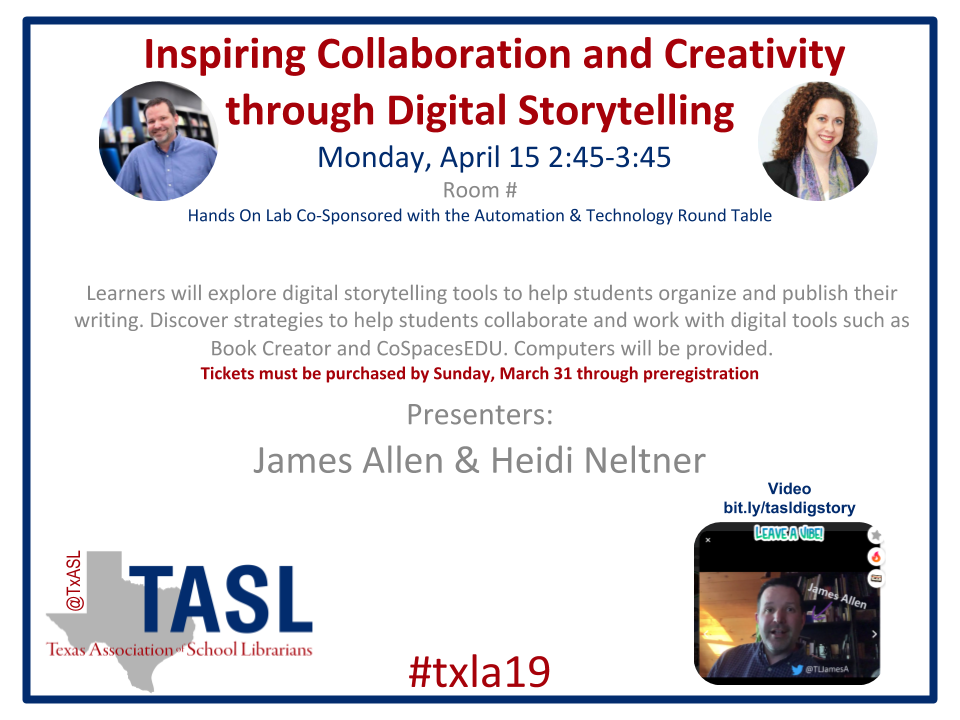
TASL is also hosting 2 Hands On Labs on Monday. You must purchase a ticket for these by March 31st. These nationally known presenters will guide you through the 3D design process using TickerCad and show you how to inspire creativity through digital storytelling using Book Creator and CoSpacesEDU.


And finally, our 39th Annual Texas Bluebonnet Award Luncheon, sponsored by Bound To Stay Bound, will be Wednesday at 12:00 and will feature the award winning book Sergeant Reckless by Patricia McCormick, Illustrated by Iacopo Bruno! You are cordially invited to purchase your ticket and come celebrate with us!


I am beyond excited about this year’s TASL Programming and I can’t wait to see you at #TXLA19! This year’s conference promises to be rich with learning and will provide many opportunities to innovate, inspire, and impact your school library!


Nancy Jo Lambert
Texas Association of School Librarians Chair 2018-2019
You can find me on Twitter @NancyJoLambert


Collaborating with Code

by Linsey Taylor, Librarian at Carpenter Elementary in Nacogdoches, Texas

In the winter of 2017, there was an article in the Nacogdoches Daily Sentinel newspaper about the (Half) Hour of Code club I do in my library.  I was super excited to have my school in the paper for something positive.  Having it be about something I was doing was in the library was an added bonus.  After reading the article, Dr. Lauren Burrow an Assistant Professor in the Elementary Education department at Stephen F. Austin State University emailed me asking if I'd be willing to demo my Code Club to her future teachers.

I didn't really know what to expect during our time together. So, as any good teacher does, I wrote down some things I wanted to highlight about our club and planned to be flexible.  During this brainstorming, I decided to ask six of my Code Club students to join us.  I wanted the kids there to help teach the college students.

I chose six students who had never missed a club meeting. I also selected a range of students from GT to high functioning Special Education.  I wanted my students to experience being the ones who know the most in a situation.  I also wanted the college students to see what a student with an IEP could do if given the chance.

My initial plan was to highlight a few points about my Code Club and how I knew nothing about code when I started.  I wanted to show the college students www.code.org, have them create an account, have my students walk around and help and show the college students where they were at on their own courses.  Everything went as planned until I turned my students loose. 

My Special Education student immediately broke the college students into groups and picked the college students that she was going to work with based on the color of their shirts.  She took control, showed them the website, helped the college students create an account then started walking them through the courses.

I was shocked!  She took control and became the teacher.  She did not hesitate.  She used her manners and her polite words.  She was a different student than I had ever seen.  She was in her element.  This was exactly what I wanted the college student teachers to see!

When Dr. Burrow and I did an informal sit-down evaluation after our two sessions we were both thrilled with the way the demonstration went.  In the past when Dr. Burrow taught a lesson in a college classroom setting on code her students left evaluations saying they didn’t think coding had a place in their future classrooms.  They were frustrated and their confidence was low.  After our time together the college students wrote evaluations that stated they thought about integrating coding into their classroom now but were still a little uncertain about how to go about doing that.  Their frustration level was lower and their confidence increased.

My students learned they could be leaders, they had the knowledge to share with others, and they wanted to continue to teach others.  They realized they were a part of something to be proud of.  Some of them also learned that they could shine in different educational settings even if learning was hard for them.

My advice: Collaborating can be hard. So if someone contacts you say “Yes!”  Have your students lead as much as possible.  This isn’t my club, it’s their club.  I wanted them to shine.  Which leads me to this--- expect the unexpected.  I did not expect my students to take over the way they did.  They were awesome!  Also, reach out to others, don’t wait for them to reach out to you.

Dr. Burrow’s advice: Always be looking and listening. If she hadn’t read the newspaper that day we would have missed this awesome opportunity. Leave time to actually talk with your community partner and acknowledge their contributions.  Share the partnership success with your students so they have an incentive/a model to partner with community members when they are teachers. 

This started out as a Service-Learning Project for the college students but it turned out to be a reversal of Service-Learning.  Typically, the college goes out into the community and shares their knowledge.  This time the community taught the college students.  This collaboration model could be used with any topic that students know more about than college students.  The sky’s the limit!

Because of this collaboration, Dr. Burrow submitted a proposal to the International Association for Research On Service-Learning and Community Engagement Conference.  It was accepted and in September 2017 Dr. Burrow and I presented a lighting presentation at IARSLCE in Galway, Ireland.  All because I said “Yes!”

Linsey Taylor has been an elementary teacher librarian since 2013.  She graduated from Sam Houston State University with a Master of Library Science in 2002.  She also graduated from Stephen F. Austin State University with a Bachelor of Hearing Impaired Education.  She has been a member of Texas Library Association since 2013.  Taylor has presented at various conferences and trainings as well as has an article published in Teachers Net Gazette.  She started a LEGO club, a book club and a code club at her current school.  The code club took her to Ireland to co-present at the International Association for Research on Service-Learning Engagement conference. Linsey Taylor lives in Nacogdoches with her husband, their daughter and their lovable black lab.


Computer Science in the Library is more than a C++

by Brooke King, Middle School Librarian in Humble ISD, TxASLTalks Editorial Board and Cynthia Cooksey, Perez Elementary Librarian in McAllen, TX


Computer Science is our future. It drives innovation. According to Code.org, there are currently 500,000 open computing jobs nationwide.


Libraries can take part in promoting computer science this week during Computer Science Education Week. CSEdWeek is an annual program dedicated to inspiring K-12 students to take interest in computer science. It is held the week when December 9 falls in honor of computing pioneer Admiral Grace Murray Hopper’s birthday. The library can host programs that promote the computer sciences by introducing students to different opportunities. One simple way is to try Hour of Code which provides students a one-hour introduction to computer science, designed to unmask code and show that anybody can learn the basics.

Cynthia Cooksey, the librarian at Perez Elementary in McAllen, TX, shares how she incorporates coding in the library:

Two years ago, I made one of the best investments of my library career.  I invested in the students and myself by deciding to incorporate coding and robotics into the library curriculum.  I didn’t just want to teach coding, I wanted to learn how to code as well, and getting to use a robot was just the cherry on top of the cake.  Like many others, I didn’t have a clue about what coding entailed.  Sure, I had heard of the “Hour of Code,” but I had never really participated in it.   My coding experience was limited to finding a couple of websites that had block style coding for teachers to use with students during the Hour of Code the prior year.  But, something sparked my interest when I saw those programs, and I set out to bring coding to life on our campus.

As luck would have it, our local community (McAllen Educational Foundation) sponsored several grants that year, and my grant – Robotics Rocks! - was selected.  I purchased four sets of Dash and Dot robotic sets which arrived in October.  Little did I know that this one purchase would totally revolutionize the school library and my career.

Literally days after the robots arrived I received an email from Wonder Workshop, the makers of Dash and Dot.  I had not even charged the robots yet when I saw the email advertising the first ever Wonder League Robotics Competition.    This free competition was available to elementary age students throughout the United States.  My initial thought was, "No way," as I knew little to nothing about coding.  The students had only had one Hour of Code the year before.  Our campus wasn’t big into coding, and  there was no way we could compete.  Then, I remembered my mother’s words, “Nothing ventured, nothing gained.”  So, it was on!  I gathered a group of girls together, and we formed an after school coding club with the specific target of participating in that contest.  It was certainly not easy forming a girls’ coding club.  I had to really “talk it up” with the girls.  I drew on my reading relationships with some to get them on board, but in the end, it was worth every hour I spent after school working with them.

When I implemented coding during library class time, things really hit a high note.  I began by introducing the second through fifth grades to basic coding.  We started with simple things – moving up and down a line while incorporating lights and sounds (using measurement).  It took a bit of work at first to teach coding as I had to model everything I wanted the students to use.  But, as they began to code and realized that their codes were actually controlling Dash, they were hooked.  Once hooked, they began to get a bit more creative and explore some of the control features on their own.  Next, we incorporated shapes.  Having the students move Dash around a square, rectangle, triangle, etc., the students reinforced their knowledge of angles.
 
After a few coding lessons, we got to the point where students entered the library and returned their books – ready for me to assign them a coding task.  As they were coding in their groups, I would shelve the books they had returned and then walk around to make sure they were on task and see if they needed any assistance.

Later in the year, Pre-kinder through first grade were introduced to Dot.  They learned the foundations of coding by changing Dot’s colors and making Dot say something or make a sound.  Once I was sure they understood how to properly care for the robots, they met Dash and robotics really took off in the lower grades.  The excitement they felt when they actually saw Dash move based on their codes was breathtaking.  Their squeals, laughter, and the twinkles in their eyes cannot be measured.  It’s two years later and the students still cannot get enough of coding in the library.  They are always asking to use Dash and Dot and make fist pumps whenever they see Dash and Dot come out on their storage cart.

That first year of coding in the library was very basic.  The students only completed linear codes – which was a great starting point.  Last year, we began a push into intermediate coding skills – incorporating some conditional statements, such as “if Dash sees Dot,” “if Dash detects an object” and “If else” statements.  This year, we continue the push forward introducing algorithms using call statements and repeat functions.  It’s an ever changing world with technology, and our students should be on the front lines of technology - ready to take on real world challenges.


If you want to teach the Hour of Code this week or any week, Code.org provides step-by-step instructions. Learn more at HourofCode.com, try an hour yourself, or host an Hour of Code event to introduce others to the world of computing. Inspire students to try any aspect of computer science with teaching tips, videos, posters and more. Need help organizing other events to celebrate CSEdWeek? Check out Code.org’s tips.